Uploading to Steam Workshop
Before uploading, you must accept the Steam Workshop Legal Agreement and make sure your mod follows
our Modding Guidelines.
Folder Structure
Organize your mod folder for workshop upload:
MyFirstMod/
├── mod.json
├── preview.png
└── plugins/
    └── MyFirstMod.dll
Valid Root Folders
Your mod can only contain the following root folders:
| Folder | Purpose |
|---|---|
plugins/ | Your compiled .dll files |
patchers/ | Preloader patchers |
config/ | Config files |
bundles/ | Bundles |
Uploading
mod.json
All mods require a mod.json file for workshop upload. This configures the metadata and ensures the game recognizes whether users need to download your mod.
{
    "title": "My First Mod",
    "description": "A simple example mod for Delivery & Beyond",
    "type": "CLIENT",
    "author": "YourName",
    "preview": "./preview.png"
}
Required Fields
| Field | Description |
|---|---|
title | Display name on the Steam Workshop |
description | Short description of your mod |
type | Determines who needs the mod installed (see below) |
preview | Path to your thumbnail image (PNG, JPG, or GIF, under 1MB) |
Mod Types
Using the wrong type can cause desync issues in multiplayer.
| Type | Description |
|---|---|
CLIENT | Only the local player needs this mod installed |
SERVER | Only the host/server needs this mod installed |
SHARED | All players must have this mod installed |
Optional Fields
{
    "author": "YourName",
    "repo": "https://github.com/yourname/myfirstmod",
    "tags": ["MISC", "UTIL"],
    "dependencies": ["3376480123456789"],
    "ignore": ["README.md", ".git"]
}
| Field | Description |
|---|---|
author | Your name or username |
repo | Link to your source code repository |
tags | Categories for your mod |
dependencies | Workshop item IDs this mod depends on (if any) |
ignore | Files/folders to exclude from upload |
Available Tags
MAPENTITIESMODELSMISCUTIL
Supported File Types
.dll, .cfg, .json, .xml, .txt, .png, .jpg, .jpeg, .gif, .wav, .ogg, .mp3, .bundle, .assets
Uploading to Workshop
Use the Delivery & Beyond Tools to upload your mod located next to the game's executable:
Run the tool without arguments for interactive mode:
delivery-beyond-tools
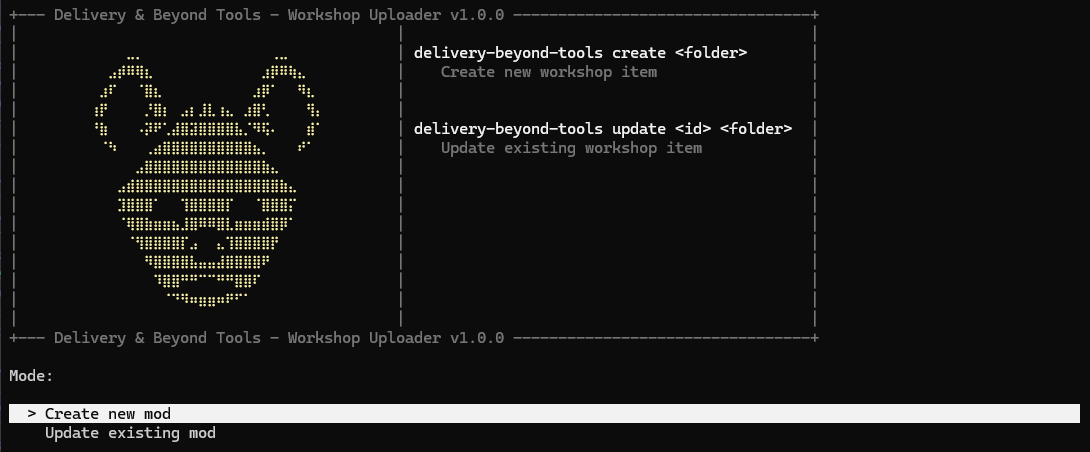 or
or
Create a New Mod
delivery-beyond-tools create "C:\path\to\MyFirstMod"
Update an Existing Mod
delivery-beyond-tools update <workshop-id> "C:\path\to\MyFirstMod"
Complete Example
Plugin.cs
using BepInEx;
using BepInEx.Configuration;
using HarmonyLib;
using System;
using System.Reflection;
using UnityEngine.SceneManagement;

namespace TimeExtender;

[BepInPlugin("com.yourname.my-awesome-mod", "Awesome Mod", "1.0.0")]
public class Plugin : BaseUnityPlugin
{
    internal static new ManualLogSource Logger;

    private void Awake()
    {
        Logger = base.Logger;
        Logger.LogInfo("Awesome Mod loaded successfully!");

        SceneManager.sceneLoaded += OnSceneLoaded;
    }

    private void OnDestroy()
    {
        SceneManager.sceneLoaded -= OnSceneLoaded;
    }

    private void OnSceneLoaded(Scene scene, LoadSceneMode mode)
    {
        if (scene.name != "INGAME") return; // Server is fully initialized on "ingame" scene

        if (NETController.Instance.IsServer) {
            Logger.LogInfo("Running on server!");
        } else {
            Logger.LogInfo("Running on server and client!");
        }
    }
}
mod.json
{
    "title": "Awesome Mod",
    "description": "Prints a console command if running on server or client",
    "type": "SHARED",
    "author": "YourName",
    "preview": "./thumbnail.png",
    "tags": ["UTIL"]
}